
🚀GetMarked.ai for Converting Quiz Questions to Moodle: Limited-Time Pilot for UM Faculty
🚀 GetMarked.ai 測驗題目轉換工具(Moodle 格式):澳大教師限時試行服務

Looking for ways to provide students with constructive feedback without increasing your marking time? CTLE’s pilot of GetMarked.ai (available through April 2026) can help convert quiz questions for use in UMMoodle.
What is GetMarked.ai?
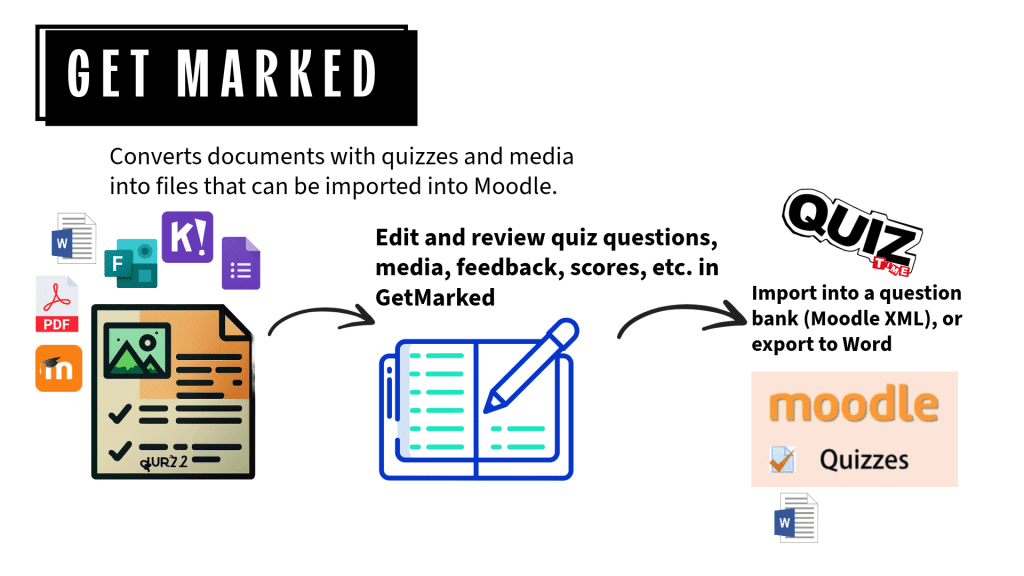
GetMarked.ai is a powerful digital tool that helps teachers convert and revise quiz questions from Word, PDF, Socrative, Kahoot!, MS Forms, and more into formats compatible with Moodle’s Question Bank. It supports a wide range of question types including multiple choice, cloze, matching, and open-ended formats.
How to Access
Teachers and teaching assistants can access GetMarked directly through UMMoodle:
- Create a GetMarked activity in your course (only once).
- Click the link to authenticate and open the GetMarked Digitalizer platform.
- Upload your quiz in a Word document, review and edit questions in GetMarked, then export to Moodle XML format for easy import into your course’s Question Bank.
🔒 Note: This service is only available to users with “teacher” or “teaching assistant” roles. Students are not eligible.
Get started!
- 🧭 Read a quick start user guide: ctle.um.edu.mo/resource/guide-to-getmarked-ai/
- 📖 Read the official guide.
- 📅 To schedule a consultation, email chrisfulton@um.edu.mo.
Take advantage of this pilot to streamline your quiz creation and enhance your teaching workflow!
Follow CTLE on social media: