
GenAI Service Update: Image Generation and OCR Released
GenAI 服務更新:新增影像生成及光學字元辨識 (OCR)

We are pleased to announce a major update to the University’s GenAI Service, introducing image generation and optical character recognition (OCR) capabilities. These enhancements further expand the service’s multimodal AI support while maintaining on‑premise security and data confidentiality.
New Feature: Image Generation
Now support AI‑powered image generation, allowing users to create images directly from text prompts.
How to Use Image Generation
- Open the GenAI service, and select GenAI WebUI at the end.
- Select the model “Qwen/Qwen3-VL-235B-A22B-Instruct-FP8” on the top of the interface.
- Enter a text prompt describing the image you want to generate.
- Click “integrations” and enable “Image” below the prompt.

- Submit the prompt and wait for the generated image to appear (approximately 30~60 seconds).
- Refine the prompt if needed to regenerate or improve the image.

New Feature: OCR (Optical Character Recognition)
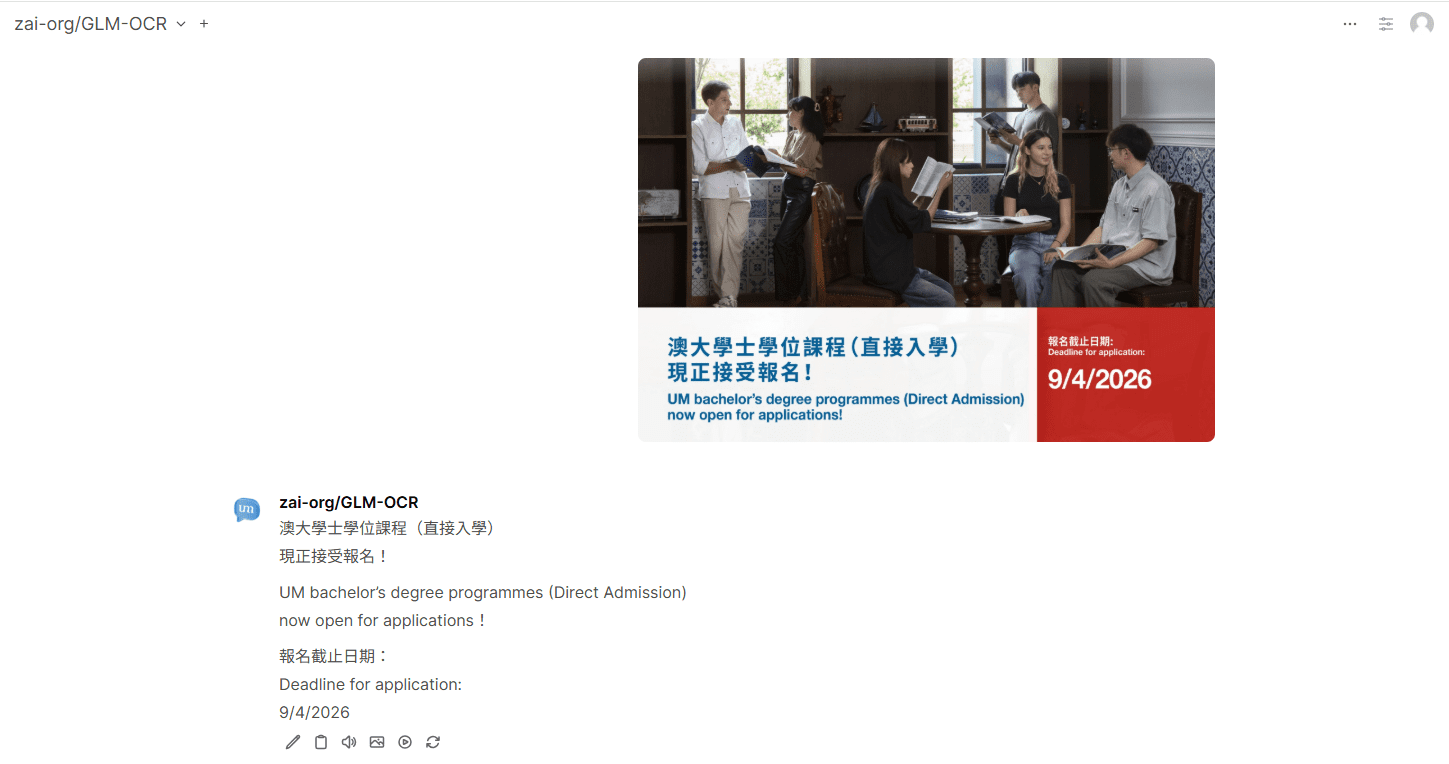
An OCR‑capable models GLM OCR is now available, enabling users to extract text from images and scanned documents.
How to Use OCR
- Open the GenAI service, and select GenAI WebUI at the end.
- Select zai-org/GLM-OCR.
- Upload an image or scanned document containing text.
- Enter a text prompt (e.g. “Convert to text”, “Free OCR”)
- Submit the request to perform OCR.
- Review and copy the extracted text from the response.
Need Help?
If you have any questions, please contact:
ICTO Help Desk
| Location : | Room 2085, 2/F, Central Teaching Building (E5) eMap |
| Telephone : | 8822 8600 |
| Email : | icto.helpdesk@um.edu.mo |
大學 GenAI Service 更新完成,新增影像生成及光學字元辨識(OCR)功能。這些新功能進一步擴展了服務的多模態 AI 能力,同時維持本地部署(On‑Premise)的安全性與資料保密性。
新功能:影像生成
GenAI 服務現已支援 AI 影像生成,使用者可透過文字提示直接生成圖片。
影像生成使用步驟
- 開啟 GenAI 服務,選擇GenAI WebUI。
- 於介面上方選擇模型 「Qwen/Qwen3‑VL‑235B‑A22B‑Instruct‑FP8」。
- 輸入描述欲生成影像的文字提示。
- 點擊提示框下方的 「Integrations」,並啟用 「Image」。
- 提交請求並等待影像生成(約需 30–60 秒)。
- 如有需要,可調整提示內容以重新生成或優化影像。
新功能: OCR(光學字元辨識)
現已提供支援 OCR 的模型 —— GLM OCR ,讓使用者可從圖片或掃描文件中擷取文字內容。
OCR 使用步驟
- 開啟 GenAI 服務,選擇GenAI WebUI。
- 選擇zai‑org/GLM‑OCR 。
- 上傳包含文字的圖片或掃描文件。
- 輸入文字提示(例如:「轉換為文字」、「Free OCR」)。
- 提交請求以執行 OCR。
- 檢視並複製回傳的辨識文字內容。
查詢
如有任何疑問,歡迎聯絡:
資訊及通訊科技部服務中心
| 位置 : | 中央教學樓東5座(E5)2085室 電子地圖 |
| 電話 : | 8822 8600 |
| 電郵 : | icto.helpdesk@um.edu.mo |